THE PROBLEM:
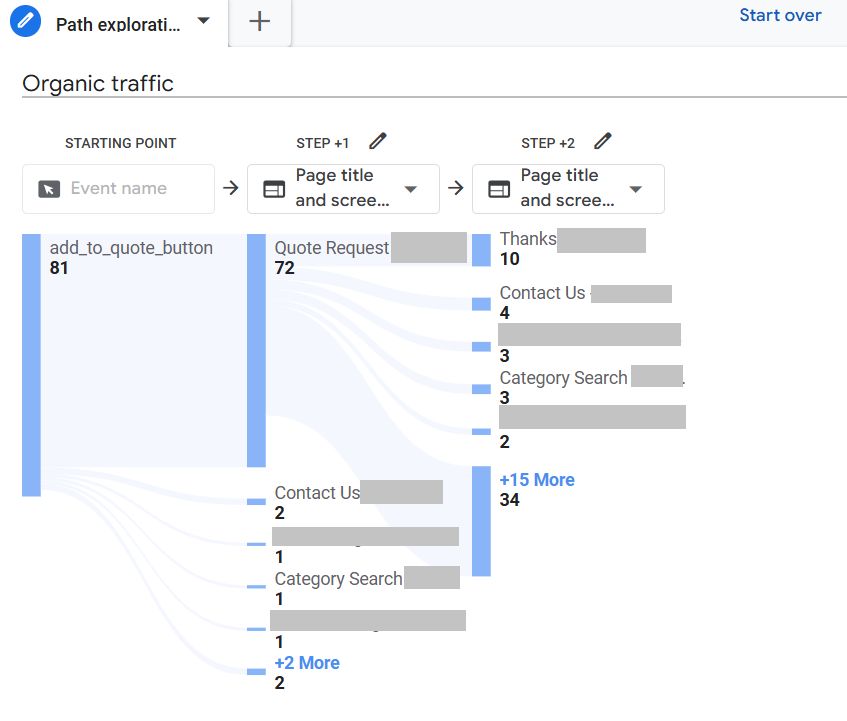
– 81 users clicked “Request Quote”, but only 10 completed the form.
– Even accounting for bots and casual browsers, this was concerning.
THE CONTEXT:
This wasn’t an e-commerce site. In industrial B2B, bulk orders require custom quotes – no direct pricing. Users select products, hit “Request Quote,” and land on a page where they fill out a form.
But something was breaking between click and completion.
THE DIAGNOSIS:
1. Google Analytics Path Exploration:
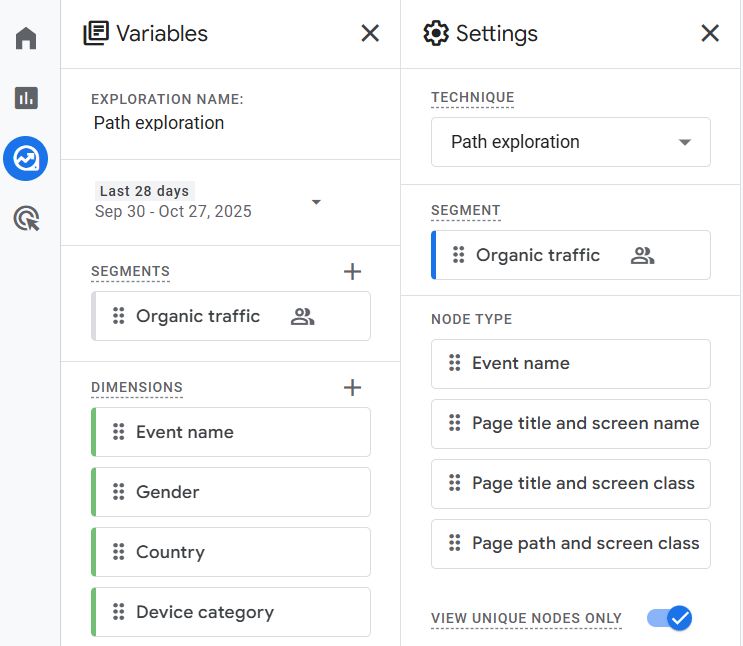
– Set up a funnel to track the user journey from quote button click to form submission.
– The data confirmed it: users were landing on the form page, but very few were converting. (I have shared the screenshots to show the funnel and settings involved)
2. Microsoft Clarity (the game-changer)
Here’s where it got interesting:
→ Filtered session recordings for users who hit the form page. The filter range in Clarity is excellent for drilling down.
→ Watched 25 recordings to identify patterns
3. The patterns I found:
→ Most users didn’t realize there was a form below the product cart
→ Some saw the long form and immediately bounced
→ Mobile UX made it worse – form wasn’t immediately visible
The issue wasn’t the form itself. It was discoverability and first impression.
WHAT’S NEXT:
→ Documenting findings for the client
→ Recommending UX changes (form position, progressive disclosure)
→ Measuring impact next month
THE LESSON:
Quantitative data (GA4) tells you WHERE the problem is.
Qualitative data (Clarity recordings) tells you WHY.
You need both.